

After comparing Ibexa Commerce with Sylius, let's now dig deeper into the technical details.
Installing Ibexa Commerce
As with Ibexa DXP, you need an authorisation key and a token to authenticate with Ibexa's servers and download the dependencies.
The installation is similar to any project initialised with composer . The post-installation commands provided in the documentation work well for MariaDB.
By default, all projects are installed with a default Symfony and Docker configuration for PostgreSQL. As I use Docker on my development machine, I had to modify the Docker Compose and Symfony configuration (.env ) to switch from PostgreSQL to MariaDB.
Data storage
Let's go straight to the way data is stored in the Commerce module. The choices made by the Ibexa teams are simple: use the same recipe as for content. So we find “Product Types” in the same tables as “Content Types”, and “Products” are in the same tables as “Contents”.
Attributes, which can be added to a product type, are treated as a custom field type for storage.
Apart from that, there are new tables; here are the ones that caught my attention:
- ibexa_product_specification_availability contains product stock.
- ibexa_product_specification_price contains the price of a product for everyone and for customer groups. Unfortunately, amounts are stored as decimals with 4 digits after the decimal point. Watch out for rounding!
- ibexa_order contains information about an order. The context column stores the billing and shipping addresses in JSON format, along with other pricing information.
- The ibexa_order_item , ibexa_order_item_product , ibexa_order_item_product_assignment and ibexa_order_item_value tables store information about the ordered products.
- ibexa_order_value contains order totals.
- ibexa_payment contains payment information for orders.
La Poste
Now let's try to set up the carrier in our Ibexa Commerce instance by following the documentation.
Prerequisites
Before starting, we need to define the format of the weight bands with their corresponding price.
To keep things simple, weights are expressed in grams and prices in cents. Weight and price are separated by a colon “:” and the different prices are separated by a semicolon “;”. Finally, weights must be in ascending order to make the list easier to use.
So here is the value to store (this is not La Poste's actual price grid): 125:50;250:120;1000:1280;5000:2850
We also need to know the currency used in the grid.
That's it for the data we manage with the carrier. We need all shippable products to have a “weight” property of type “Measurement (single)”.
Configuring the shipping method type
The first thing to do is add a shipping method type. This first step defines certain things for everything that follows.
services:
    app.shipping.shipping_method_type.custom:
        class: Ibexa\Shipping\ShippingMethod\ShippingMethodType
        arguments:
            $identifier: 'custom'
        tags:
            - name: ibexa.shipping.shipping_method_type
              alias: custom
The term “custom” must be replaced by your custom type. This term will then be used for all configurations. In our example, I chose “grid” because it is a carrier using a price grid.
Carrier configuration form
The next subtlety lies in the form that will be used to configure the carrier.
The field type to use for the currency is Ibexa\Bundle\ProductCatalog\Form\Type\CurrencyChoiceType . But to avoid type conversion errors, you need to use the Ibexa\Bundle\Shipping\Form\DataTransformer\CurrencyTransformer transformer.
Here is the complete class:
<?php
declare(strict_types=1);
namespace App\ShippingMethodType\Form\Type;

use Ibexa\Bundle\ProductCatalog\Form\Type\CurrencyChoiceType;
use Ibexa\Bundle\Shipping\Form\DataTransformer\CurrencyTransformer;
use Ibexa\Contracts\ProductCatalog\CurrencyServiceInterface;
use Ibexa\Contracts\ProductCatalog\Values\Currency\Query\Criterion\IsCurrencyEnabledCriterion;
use JMS\TranslationBundle\Translation\TranslationContainerInterface;
use Symfony\Component\Form\AbstractType;
use Symfony\Component\Form\FormBuilderInterface;
use JMS\TranslationBundle\Model\Message;
use Symfony\Component\Form\Extension\Core\Type\TextType;
use Symfony\Component\OptionsResolver\OptionsResolver;
final class GridShippingMethodOptionsType extends AbstractType implements TranslationContainerInterface
{
    private CurrencyServiceInterface $currencyService;
    public function __construct(CurrencyServiceInterface $currencyService)
    {
        $this->currencyService = $currencyService;
    }
    public function getBlockPrefix(): string
    {
        return 'ibexa_shipping_method_grid';
    }
    public function buildForm(FormBuilderInterface $builder, array $options): void
    {
        $builder->add('price_grid', TextType::class);
        $builder->add('currency', CurrencyChoiceType::class, [
            'criterion' => new IsCurrencyEnabledCriterion(),
            'required' => true,
            'disabled' => $options['translation_mode'],
        ]);
        $builder->get('currency')
            ->addModelTransformer(new CurrencyTransformer($this->currencyService));
    }
    public function configureOptions(OptionsResolver $resolver): void
    {
        $resolver->setDefaults([
            'translation_domain' => 'ibexa_shipping',
            'translation_mode' => false,
        ]);
        $resolver->setAllowedTypes('translation_mode', 'bool');
    }
    public static function getTranslationMessages(): array
    {
        return [
            Message::create('ibexa.shipping_types.grid.name', 'ibexa_shipping')->setDesc('Grid'),
        ];
    }
}
Option Validator
After asking the user for information, it is essential to validate that the input is correct.
With this Symfony service, I checked that the weight and price grid is consistent and does not contain any odd characters.
Here is a simple implementation of the check:
    public function validateOptions(OptionsBag $options): array
    {
        $priceGrid = $options->get('price_grid');
        if ($priceGrid === null) {
            return [
                new OptionsValidatorError('[price_grid]', self::MESSAGE),
            ];
        }
        $errors = [];
        $ranges = explode(';', $priceGrid);
        foreach ($ranges as $key => $range) {
            if (empty($range)) {
                $errors[] = new OptionsValidatorError(
                    '[price_grid]',
                    'Empty range is not allowed (index: ' . ($key + 1) . ')'
                );
                continue;
            }
            if (str_contains($range, ':') === false) {
                $errors[] = new OptionsValidatorError(
                    '[price_grid]',
                    'Invalid range format. Use ":" to separate weight and price (index: ' . ($key + 1) . ')'
                );
                continue;
            }
            [$weight, $price] = explode(':', $range);
            if (!preg_match('/^[0-9]+$/', $weight)) {
                $errors[] = new OptionsValidatorError(
                    '[price_grid]',
                    'Invalid weight format. Type the weight in gramme (index: ' . ($key + 1) . ', wrong value: '.$weight.')'
                );
            }
            if (!preg_match('/^[0-9]+$/', $price)) {
                $errors[] = new OptionsValidatorError(
                    '[price_grid]',
                    'Invalid price format. Type the price in cent (index: ' . ($key + 1) . ', wrong value: '.$price.')'
                );
            }
        }
        return $errors;
    }
Database storage
For storage, I customised the objects to match this database schema:
create table ibexa_shipping_method_region_grid
(
    id                        int auto_increment primary key,
    price_grid                text not null,
    currency_id               int  not null,
    shipping_method_region_id int not  null
);
The schema definition file:
<?php
declare(strict_types=1);
namespace App\ShippingMethodType\Storage;
use Doctrine\DBAL\Types\Types;
use Ibexa\Contracts\Shipping\Local\ShippingMethod\StorageDefinitionInterface;
use Ibexa\Shipping\Persistence\Legacy\ShippingMethod\AbstractOptionsStorageSchema;
final class StorageDefinition implements StorageDefinitionInterface
{
    public function getColumns(): array
    {
        return [
            AbstractOptionsStorageSchema::COLUMN_SHIPPING_METHOD_REGION_ID => Types::INTEGER,
            StorageSchema::COLUMN_PRICE_GRID => Types::STRING,
            StorageSchema::COLUMN_CURRENCY => Types::INTEGER,
        ];
    }
    public function getTableName(): string
    {
        return StorageSchema::TABLE_NAME;
    }
}
Here is the class that converts data between the database and the carrier configuration object:
<?php
declare(strict_types=1);
namespace App\ShippingMethodType\Storage;
use Ibexa\Contracts\Shipping\Local\ShippingMethod\StorageConverterInterface;
final class StorageConverter implements StorageConverterInterface
{
    public function fromPersistence(array $data)
    {
        $value['price_grid'] = $data['price_grid'];
        $value['currency'] = $data['currency_id']??null;
        return $value;
    }
    public function toPersistence($value): array
    {
        return [
            StorageSchema::COLUMN_PRICE_GRID => $value['price_grid'],
            StorageSchema::COLUMN_CURRENCY => $value['currency'],
        ];
    }
}
All constants are defined in the src/ShippingMethodType/Storage/StorageSchema.php file and contain the names of the table and columns in the database.
Showing the carrier for an order or not
For my test, the voter always enables the carrier. But it would be useful to check at this point that the total weight of the order does not exceed the maximum weight in the rate grid.
If it does, the carrier will not be selectable when choosing the carrier and payment method.
Another approach is to divide the parcel weight by the carrier's maximum weight. Rounding up gives an idea of the number of parcels.
Multiplying the price of the last band by the number of parcels gives a price.
This calculation is only valid if you know that no product weighs more than the carrier's maximum weight. There are other possible ways to calculate it, which I will leave to your imagination.
Displaying the shipping price in the back office
When you add a carrier, you need to be able to display the price grid in a more readable way for administrators.
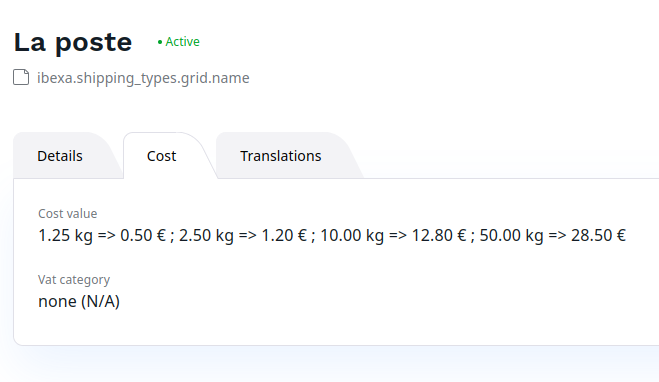
Here is the code used to transform the grid:
<?php
declare(strict_types=1);
namespace App\ShippingMethodType\Formatter;
use Ibexa\Contracts\Shipping\ShippingMethod\CostFormatterInterface;
use Ibexa\Contracts\Shipping\Value\ShippingMethod\ShippingMethodInterface;
final class GridCostFormatter implements CostFormatterInterface
{
    public function formatCost(ShippingMethodInterface $shippingMethod, array $parameters = []): ?string
    {
        $listPrices = explode(';', $shippingMethod->getOptions()->get('price_grid') ?? '');
        $listPrices = array_map(function ($item) {
            [$weight, $price] = explode(':', $item);
            $weight = (int)$weight / 1000;
            $price = (int)$price / 100;
            return sprintf('%0.2f kg => %0.2f €', $weight, $price);
        }, $listPrices);
        return implode(' ; ', $listPrices);
    }
}
And that's it! Do you get the same feeling as I do?
The documentation ends there, and yet at no point do we use the grid to calculate the price of an order. Let's see how to add this service.
Adding the price calculator
The first step is to add a PHP class that implements the Ibexa\Contracts\Shipping\ShippingMethod\CostCalculatorInterface interface.
This class will receive the carrier with its configuration and the order for which a shipping price needs to be calculated.
Here is my implementation:
<?php
declare(strict_types=1);
namespace App\ShippingMethodType\Calculator;

use Ibexa\Contracts\Cart\Value\CartInterface;
use Ibexa\Contracts\Measurement\Value\SimpleValueInterface;
use Ibexa\Contracts\ProductCatalog\CurrencyServiceInterface;
use Ibexa\Contracts\Shipping\ShippingMethod\CostCalculatorInterface;
use Ibexa\Contracts\Shipping\Value\ShippingMethod\ShippingMethodInterface;
use Ibexa\ProductCatalog\Money\DecimalMoneyFactory;
use Money\Currency;
use Money\Money;
final class GridCalculator implements CostCalculatorInterface
{
    private DecimalMoneyFactory $decimalMoneyFactory;
    private CurrencyServiceInterface $currencyService;
    public function __construct(
        DecimalMoneyFactory $decimalMoneyFactory,
        CurrencyServiceInterface $currencyService
    ) {
        $this->decimalMoneyFactory = $decimalMoneyFactory;
        $this->currencyService = $currencyService;
    }
    public function calculate(ShippingMethodInterface $method, CartInterface $cart): Money
    {
        $listPrices = explode(';', $method->getOptions()->get('price_grid') ?? '');
        $prices = [];
        foreach ($listPrices as $item) {
            [$weight, $price] = explode(':', $item);
            $prices[$weight] = number_format($price / 100, 2, '.', '');
        }
        $currencyId = $method->getOptions()->get('currency');
        $currency = $this->currencyService->getCurrency($currencyId);
        $weight = 0;
        foreach ($cart->getEntries() as $entry) {
            foreach ($entry->getProduct()->getAttributes() as $key => $attribute) {
                if ($key === 'weight') {
                    $value = $attribute->getValue();
                    if ($value instanceof SimpleValueInterface === false) {
                        continue;
                    }
                    $weight += ($value->getValue() * $entry->getQuantity());
                }
            }
        }
        $price = "500.00";
        foreach ($prices as $maxWeight => $levelPrice) {
            if ($maxWeight < $weight) {
                continue;
            }
            $price = $levelPrice;
        }
        return $this->decimalMoneyFactory->getMoneyParser()->parse(
            $price,
            new Currency($currency->getCode())
        );
    }
}
If you have a keen eye, you will have noticed that the shipping price when the grid is exceeded is €500.
One step remains: configuring the service in the services file.
services:
    App\ShippingMethodType\Calculator\GridCalculator:
        tags:
            - { name: 'ibexa.shipping.shipping.cost_calculator', method: 'grid' }
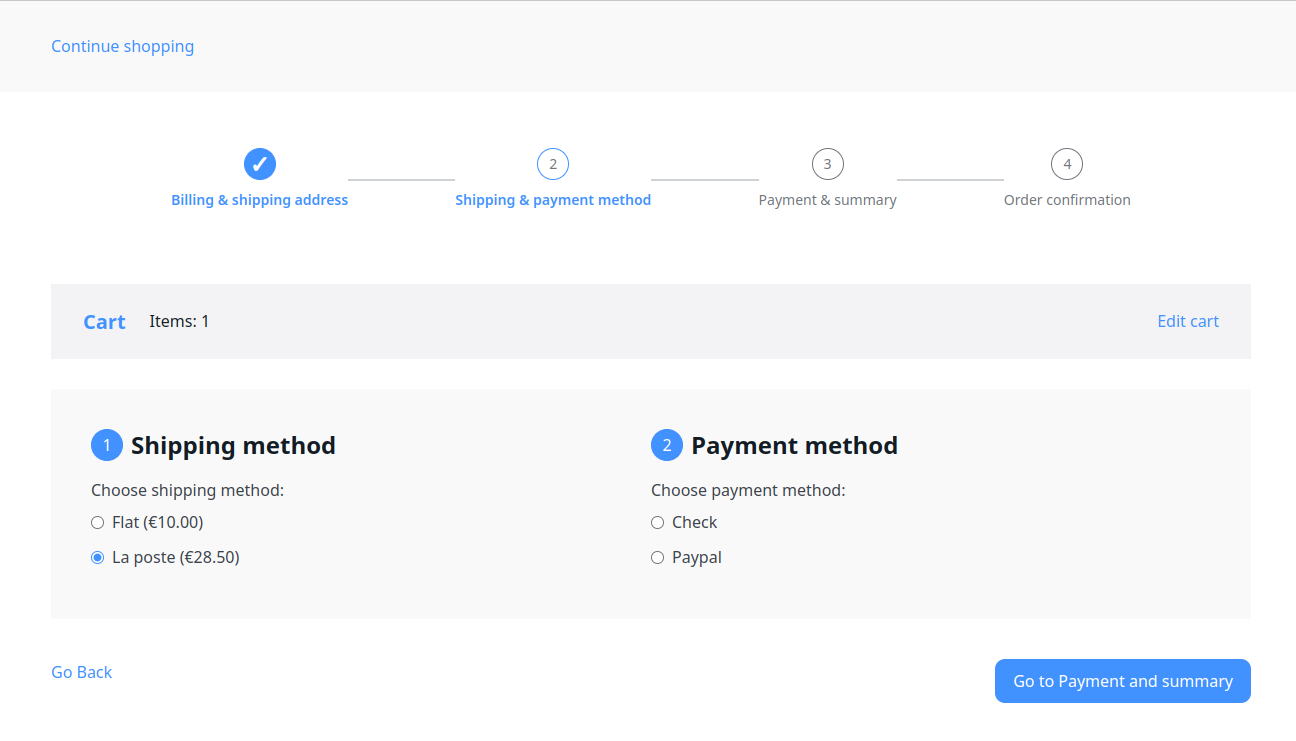
And here is the result in the checkout:
Conclusion
Adding a carrier is a somewhat lengthy procedure, but the documentation is comprehensive and almost complete.
Personally, I would have preferred automatic tagging on the interfaces, with a static function in the service to get the shipping method type. This simplifies configuration as long as the service is used for a single shipping method type.
Adding this type of carrier highlighted that Ibexa Commerce cannot handle multiple parcels for a single order. Nor can it manage a parcel number to add a tracking link in the customer area. Even if this feature is less useful for business customers, it is still worth adding to your project.
Nos derniers articles
Ibexa DXP and Claude: enabling the MCP server and using it every day
Since version 5.0.8, Ibexa DXP ships an MCP (Model Context Protocol) server that lets an ...
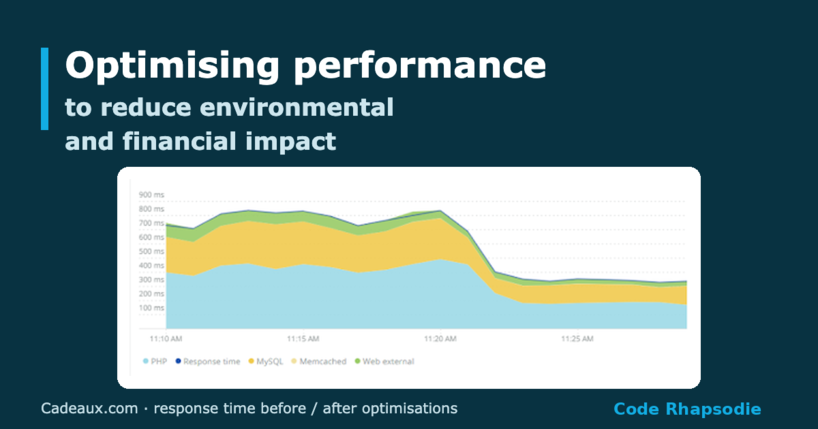
Optimising performance to reduce environmental and financial impact
Cadeaux.com saw its Valentine's Day outperform Christmas with half as many servers. A look back ...
Dataflow and Ibexa Dataflow 7: UTC dates, richer job tracking, stronger security
Since our last article, Ibexa Dataflow has gone from version 6.1.2 to 7.0.0: a richer ...
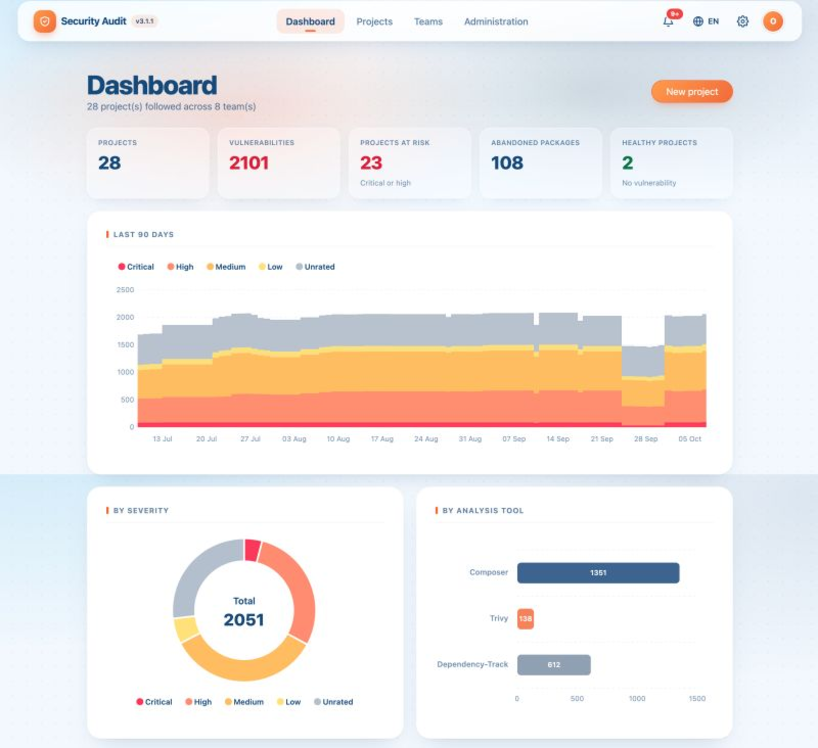
Security Audit gets a makeover: new design, new dashboard, still free
New dashboard, new design, new analyses and an ambitious roadmap: Security Audit moves to version ...

AI-generated code, Shadow Dev and technical debt: how to avoid destabilising your PHP/Symfony application
While AI assistants have revolutionised code production by significantly speeding up development, their widespread use ...

What's new in Dataflow: file-based log storage and automated history cleanup
Fed up with having your job logs in the database? Even more fed up with ...
How to use parameters with ibexa_render and ibexa_render_location
If you have been developing on Ibexa for a few years, you have probably got ...
Taking over maintenance of the Apple provider for PHP League OAuth2 Client
Code Rhapsodie is taking over maintenance of Patrick Bussmann's oauth2-apple package. This fork ensures the ...

New keyword suggestion feature in the Gemini connector for Ibexa
Taxonomy keyword suggestion is available in Ibexa DXP with the LTS update pack and the ...